AFLED on nCONFIG...
Added by Austin Franklin 4 months ago
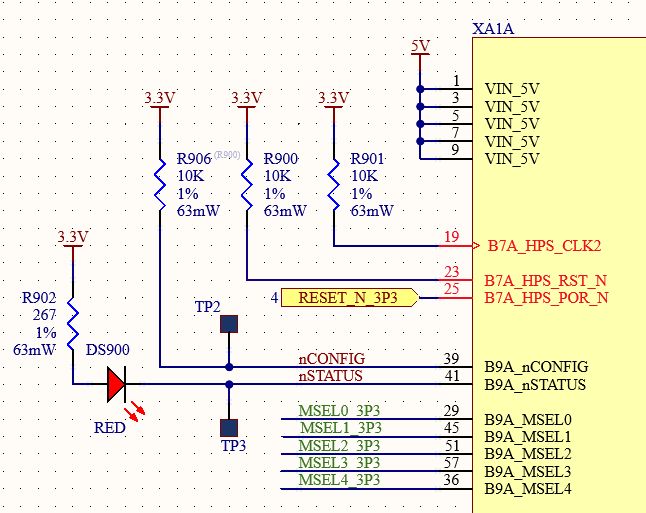
On the CriticalLink MitySOM-5CSX development board, there is an LED D100 connected to nCONFIG (pin 39). According to the Intel/Altera documentation, nCONFIG is an input to the Cyclone V. I don't find anything in the Intel/Altera docs that suggest the Cyclone V can drive this pin. The Cyclone V can drive the nSTATUS pin, and the flow charts show that the nSTATUS pin changes state during different stages of configuration. So, was this LED supposed to go on the nSTATUS pin, or is the Cyclone V capable of driving the nCONFIG pin? And if it is, is there some documentation that gives a description of what it does? Thank you! -Austin
Replies (2)
MF RE: LED on nCONFIG... - Added by Mike Fiorenza 4 months ago
Hi Austin,
You are correct that the Cyclone V cannot drive this pin. It is a configuration control input which must be driven externally via HW if needed. You would drive this pin low if you needed to reset, reconfigure the device or hold this pin low if you had different power sequencing on the baseboard to keep the processor in reset until the power supplies are ready.
On our baseboard the nCONFIG signal is brought to a red LED D100. This LED would illuminate if nCONFIG is low (reset / reconfiguration) however there is nothing on our baseboard design that would pull this low (unless you grounded TP10).
nSTATUS is routed to the baseboard as well at TP11. And CONFIG_DONE can bee seen on the SOM for D3 yellow LED (on means unconfigured).
The following doc talks about the use cases for nCONFIG:
https://docs.altera.com/r/docs/683375/current/cyclone-v-device-handbook-volume-1-device-interfaces-and-integration
- Mike
AF RE: LED on nCONFIG... - Added by Austin Franklin 4 months ago
Hi Mike,
Thank you for the confirmation. I've attached a picture of my proposed update to our MitySOM boards. Any comments appreciated.
Best Regards,
Austin
| New_nCONFIG.jpg (66.3 KB) New_nCONFIG.jpg | Proposed update to nCONFIG & nSTATUS |