Remote Button and Power Control
Remote button and power control is possible with the J24 header on Rev -3 and onward boards. The motivation behind this is to allow remote booting of the SOM for remote work/access. The J24 lines expect 1.8V-3.3V input voltage to trigger events. A breakdown of the J24 pins can be seen below:- Pin 1 - EXT-HOME - Logic high to "press home button" i.e. pull HOMEn low.
- Pin 2 - EXT-RESIN - Logic high to "press reset button" i.e. pull RESINn low.
- Pin 3 - EXT-BUSBn - Requires a hardware modification, R258 must be populated, so will be left out of below example. This results the SOM to FORCE USB BOOT unless EXT-BUSBn is logic high.
- Pin 4 - EXT-VOL-UP - Logic high to "press volume up button" i.e. pull VOL-UPn low.
- Pin 5 - EXT-POW-EN - Logic high to "set power switch to on" i.e. enable 12V-DC rail.
- Pin 6 - EXT-POW-BTN - Logic high to "press power button" i.e. pull POW-BTNn low. Note this has to be for at least 400ms.
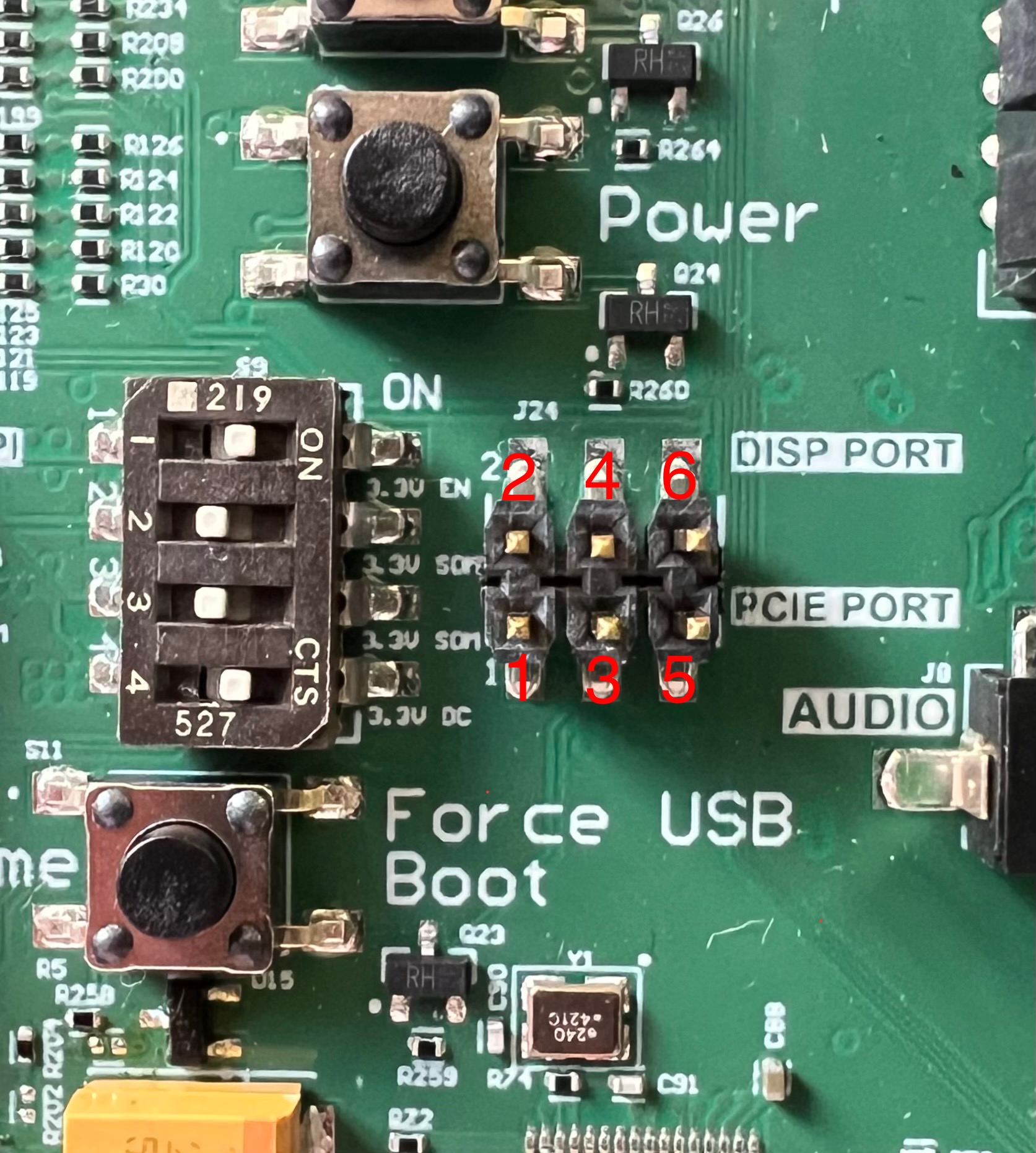
The input voltage to trigger these events can be supplied numerous ways, but for ease of remote access it's recommended to use something with remotely toggle-able GPIO pins, such as a Raspberry Pi.
This interface was validated with a Raspberry Pi 3 Model B+ by connecting GPIO lines to the J24 header pins and toggling them on/off via user space commands on the Pi. Results of the Raspberry Pi validation and how you can verify pin functionality can be seen below:| Pin | Hardware Validated? | Software Validated? | Notes |
|---|---|---|---|
| Pin 1 - EXT-HOME |  |
|
Hardware: Meter on S12 and watch voltage toggle when Pi GPIO is toggled Software: evtest /dev/input/event1 and watch for events on GPIO toggle to check in Linux |
| Pin 2 - EXT-RESIN | |
|
Hardware: Meter on S4 and watch voltage toggle when Pi GPIO is toggled Software: evtest /dev/input/event3 and watch for events on GPIO toggle to check in Linux |
| Pin 3 - EXT-BUSBn | |
|
Mod the board to populate R258. Set EXT-BUSBn logic high and can boot the SOM to Linux as usual. With EXT-BUSBn held high, can still run gpiomon ForceUSBBoot and see physical button presses. Can also still see toggles from the GPIO and Pi.Hardware: Meter on S11 and watch voltage toggle when Pi GPIO is toggled Software: gpiomon ForceUSBBoot and watch for events on GPIO toggle to check in Linux |
| Pin 4 - EXT-VOL-UP | |
|
Hardware: Meter on S3 and watch voltage toggle when Pi GPIO is toggled Software: evtest /dev/input/event1 and watch for events on GPIO toggle to check in Linux |
| Pin 5 - EXT-POW-EN | |
N/A | Hardware: Set S13 to "OFF" and toggled EXT-POW-EN with Pi. Saw D29 turn on and was able to hold S2 (Power) and boot into Linux. Also watched VBAT go high with TP4 and a meter. |
| Pin 6 - EXT-POW-BTN | |
|
Hardware: Meter on S2 and watch voltage toggle when Pi GPIO is toggled Software: evtest /dev/input/event2 and watch for events on GPIO toggle to check in Linux |
Example Usage with Raspberry Pi
An example use case with the Raspberry Pi used above would be to connect the Pi to the network, connect jumpers from the Pi's GPIO header, SSH into the Pi, and then utilize the "pinctrl" command as such, pinctrl # op dl and pinctrl # op dh, where "#" is the GPIO you want to toggle and "dl"/"dh" sets it low/high respectively.
- GPIO 17 🡒 J24 Pin 1, EXT-HOME
- GPIO 27 🡒 J24 Pin 2, EXT-RESIN
- GPIO 23 🡒 J24 Pin 4, EXT-VOL-UP
- GPIO 24 🡒 J24 Pin 5, EXT-POW-EN
- GPIO 25 🡒 J24 Pin 6, EXT-POW-BTN
After making these connections and connecting to the Pi via SSH or another form of remote access, the following steps should put the SOM in an operable state:
- Enable power to the SOM by setting EXT-POW-EN high by running
pinctrl 24 op dhin the Pi's user space. - Toggle the EXT-POW-BTN pin by running
pinctrl 25 op dhand leaving it high for at least 400ms, then runningpinctrl 25 op dl. - The SOM should now boot to Linux and allow for remote power cycling with the Pi.
- To put the SOM in EDL mode for flashing new images, run reboot edl on the SOM as EXT-BUSBn requires hardware mods to be operable.
- To toggle any of the other buttons, follow the same procedure of running
pinctrl # op dlandpinctrl # op dh, where "#" is the GPIO you want to toggle and "dl"/"dh" sets it low/high.